
When Automation Becomes a Remediation Decision
Organizations are grappling with making large volumes of PDF documents accessible before regulation takes effect. Remediating everything manually is not a practical choice, as it’s expensive and takes time. Many firms are currently evaluating AI to help create accessible PDFs at scale and at a fraction of the cost. AI has the potential to be a major game changer, but it does come with certain limitations, which organizations should be aware of.
This guide examines AI PDF accessibility beyond the automation claims: what AI can reliably handle, where human expertise remains essential, which capabilities matter when evaluating solutions, and whether AI-assisted remediation can deliver a meaningful return.
Not Sure What AI PDF Accessibility Means? Let’s Break It Down
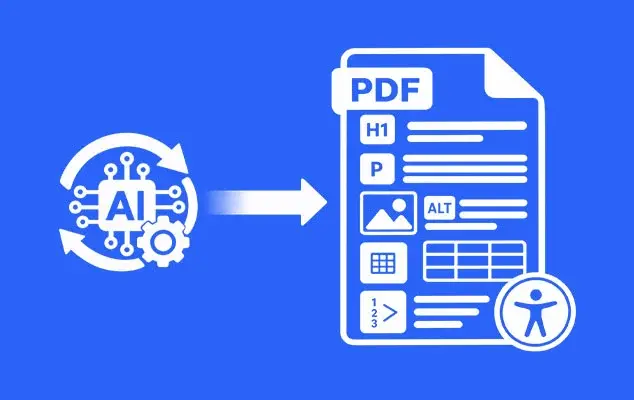
AI-powered PDF accessibility uses technologies such as machine learning, computer vision, natural language processing, and document intelligence to analyze, tag, and structure PDF documents. These technologies help identify different content elements, understand how they relate to each other, and automate parts of the accessibility remediation process.
Key AI capabilities include:
- Document Structure Recognition: Machine learning can identify headings, paragraphs, lists, forms, and other content elements within a PDF and determine how they are structured.
- OCR Recognition: For scanned PDFs that contain images of text rather than machine-readable text, OCR can recognize and convert the text into a format that can be analyzed and processed for accessibility.
- Automated Reading Order and Tagging: AI can identify the logical reading sequence of content and generate PDF tags that define the structure of the document for assistive technologies.
- Image, Table, and Form Recognition: Computer vision can identify images, charts, tables, and form elements within a document. AI can then help apply the appropriate accessibility properties, such as alt text, table structures, and form field tags.
- Automated Remediation: AI can detect common accessibility issues and apply appropriate fixes across documents, reducing the amount of repetitive manual work.
- Validation and QA: AI-powered tools can automatically check remediated PDFs for accessibility issues and generate reports that help identify remaining problems and assess compliance.
What Can AI Automate in PDF Remediation — and What Still Needs a Human?
AI can automate a significant part of PDF remediation, particularly the repetitive work involved in identifying and structuring content. It can analyze a document, recognize common elements, suggest a reading order, identify potential accessibility issues, and create an initial tag structure. This can be especially useful when organizations need to remediate large volumes of documents.
What AI Can Handle Well
- Identifying document elements: AI can recognize common elements such as headings, paragraphs, lists, tables, images, and form fields.
- Creating an initial tag structure: AI can use the content it identifies to generate PDF tags and establish a basic document structure.
- Determining reading order: AI can suggest a logical reading sequence based on the position and structure of content on the page.
- Recognizing tables: AI can identify table headers, data cells, and relationships that can be used to build an accessible table structure.
- Processing repetitive documents: When documents follow the same or similar templates, AI can apply the same remediation approach across a large number of files.
However, identifying an element is not the same as understanding what that element means in the context of the document. This is where human review remains important.
The PDF Association’s Matterhorn Protocol translates ISO 14289-1 (PDF/UA) requirements into 31 checkpoints covering 136 failure conditions. Of these, 89 conditions are strictly machine-testable, while 47 require human inspection. This illustrates an important limitation of fully automated remediation: some accessibility requirements can be checked by software, while others depend on understanding the document and its intended meaning.
For example, AI may correctly identify a heading but assign the wrong heading level. It may detect a table but misunderstand a complex relationship between headers and cells. It may determine a reading order based on page layout that does not match the way the content should actually be consumed. These are cases where a specialist needs to review the result.
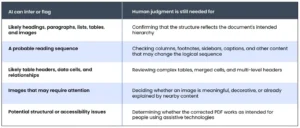
The practical approach is therefore not to treat AI and human remediation as competing methods. AI can establish the structural baseline and handle high-volume, repetitive work, while accessibility specialists review the areas where context and judgment matter. For organizations processing large PDF volumes, this hybrid approach can provide the benefits of automation without treating an automated result as the final accessibility decision.
For a closer look at where AI works well and where it can fall short, see what AI can and cannot fix in PDF accessibility.
What Features Matter Most for an AI PDF Accessibility Solution?
Choosing an AI PDF accessibility solution is not just about how many features appear on the product page. What matters is how well those features work on the types of PDFs your organization actually needs to remediate. A solution that produces accurate tags but struggles with reading order, complex tables, or forms may still leave reviewers with significant manual work.
When evaluating PDF accessibility software, focus on these capabilities:
When evaluating PDF accessibility software, focus on these capabilities:
- Tagging Engine Quality & Granularity: Look at how accurately the system identifies and tags headings, paragraphs, lists, tables, figures, links, and other elements. It should also give reviewers enough control to correct the structure when the automatically generated tags are not right.
- Advanced Layout Parsing and Reading Order: A PDF’s visual layout does not always represent its logical reading sequence. The solution should be able to handle multi-column pages, sidebars, footnotes, captions, headers, and other layouts where reading order can become difficult to determine.
- Table & Form Identification Capabilities: Tables and forms often require more than simple element recognition. Check whether the system can identify table headers and data cells, handle merged or complex tables, and correctly recognize form fields, labels, and field relationships.
- Built-In Human Review & Remediation Editor: Automated output will sometimes need correction. A built-in editor should allow accessibility specialists to review the document structure, change tags, adjust reading order, fix tables, update properties, and make other corrections without having to start the remediation process again.
- Batch Processing, API & Integration Readiness: For organizations with large document volumes, processing files one at a time is not practical. Look for batch processing, APIs, and integration options that can fit into existing document workflows and support high-volume remediation.
- Validation Engine Accuracy & Standards Support: Validation should go beyond checking whether a PDF contains tags. The solution should identify accessibility issues against the standards relevant to your organization, such as PDF/UA, WCAG, or Section 508, and provide clear results that reviewers can use to address remaining issues.
The key is to evaluate these capabilities together. Fast processing and high-volume automation are useful only if the resulting PDFs require minimal correction. During a vendor evaluation, measure both how much work the system can automate and how much work remains for a human reviewer. That gives a more realistic picture of the solution’s value than processing speed or feature count alone.
How Do I Evaluate AI PDF Accessibility Software?
Evaluating AI-based PDF remediation solutions comes down to more than watching a product demonstration. A clean, predictable demo document may show what a tool can do, but it tells you much less about how it will perform on the PDFs your organization actually receives. Here’re some practical steps to help you assess an AI-powered accessibility solution.
1. Test With the Same PDFs:
Build a test set that reflects the documents your organization actually handles. Include a straightforward report alongside a multi-column publication, scanned document, form, and table-heavy financial document. Give every solution the same files and the same instructions.
2. Measure the Output, Not Just the Processing Speed:
Look at how accurately each system handles tags, headings, tables, images, forms, and reading order. Check the output against the accessibility requirements that apply to your organization, such as WCAG, PDF/UA, or Section 508. Processing time matters, but so does the amount of correction required before the document is ready for testing.
3. See How Much Human Intervention Is Available:
Automation should not leave reviewers with a finished PDF they cannot easily correct. Test the editor and review process. Can an accessibility specialist inspect the generated structure, change tags, fix reading order, and correct tables without rebuilding the document manually?
4. Test Whether the Vendor Can Handle the Work at Scale:
Software capability and remediation capacity are two different things. If you have a large backlog, ask whether the vendor can process the volume itself, including documents that need substantial human intervention. This is especially important when your document set includes many formats, templates, and exceptions.
The comparison should ultimately come down to more than which system processes the most pages. Look at accuracy, compliance, processing time, correction effort, review options, and the vendor’s ability to handle the volume and complexity of the work you actually have.
What Are the Best AI Tools to Make PDFs Fully Accessible?
There is no single tool that fits every PDF remediation project. The right choice depends on the type of documents being processed, how much automation is required, and whether specialists need to review and correct the output. The following tools are worth considering when evaluating AI PDF accessibility software.
1. Adobe Acrobat Auto-Tag:
Adobe Acrobat is a familiar option for teams that already use Acrobat for PDF creation and editing. Its Auto-Tag feature can identify elements such as headings, paragraphs, lists, tables, and figures and create an initial tag structure. Acrobat also provides tools for checking and correcting tags, reading order, forms, and other accessibility issues.
Its main strength is that tagging and manual remediation are available within the same established PDF editor. That makes it useful for individual documents and teams that want direct control over the remediation process.
The limitation becomes more apparent with difficult layouts. Automatic tagging can need correction when a PDF contains closely spaced columns, irregular layouts, complex tables, or other structures that are difficult to interpret from the visual layout alone. Organizations working with large volumes should also consider how much manual work remains after the initial auto-tagging pass.
2. ADAPT AI:
ADAPT AI, developed by Apex CoVantage and integrated with the Documenta11y platform, takes a broader approach to PDF remediation. Instead of focusing only on tagging, it brings several stages of the workflow together, including document analysis, tagging, reading-order detection, alt-text generation, accessibility issue detection, table and form remediation, and compliance reporting.
One of the more important differences is what happens after the automated pass. ADAPT AI includes a browser-based human-in-the-loop editor where reviewers can inspect and change tags, heading levels, reading order, alt text, and text content without moving into a separate specialist tool.
It is also designed for larger workflows, with batch processing, a REST API, cloud connectors, webhooks, and cloud or on-premise deployment options. For organizations looking to automate more of the remediation process while keeping human review in the workflow, that broader coverage can be an advantage over tools that concentrate mainly on tagging.
That does not remove the need for testing. Organizations should still run their own representative PDFs through the platform, particularly complex tables, forms, multi-column layouts, and other documents where structure depends heavily on context. The useful question is how much of the work ADAPT AI handles reliably and how much correction a reviewer needs to make afterward.
3. Continual Engine PREP:
Continual Engine’s PREP is designed around automated PDF remediation and accessibility checking. Its capabilities include automated tagging, reading-order work, alt-text generation, OCR, and remediation of elements such as tables and lists. It also provides a workflow for reviewing and correcting the automated output.
The platform is worth considering for organizations that want more automation than a traditional desktop PDF editor provides. As with the other tools, though, buyers should test it against their own document mix rather than assuming that results from straightforward PDFs will carry over to complex tables, forms, or highly structured documents.
4. Equidox AI:
Equidox takes a particularly strong approach to high-volume and repeatable PDF workflows. Equidox AI is designed to process recurring document types such as statements and reports, where the same or similar layouts appear across large numbers of files.
That makes it a natural option for organizations with large collections of templated documents. Its broader remediation software also provides tools for working with document structure, reading order, lists, and tables.
The trade-off is mainly about document variety. If a backlog contains many different layouts and one-off documents rather than recurring templates, buyers should test how well the workflow handles those exceptions alongside its performance on standardized files.
5. Grackle PDF:
Grackle PDF is a browser-based option that uses AI to detect document structure and automate parts of the tagging process. The platform can identify elements such as headings, lists, tables, and images, establish reading order, and provide a visual environment for reviewing the results.
Its browser-based approach can make PDF remediation easier to access for teams that do not want to rely on specialist desktop software. For organizations with more demanding enterprise workflows, however, it is worth looking beyond individual-document editing and checking the available options for automation, integrations, volume processing, and reporting.
6. axesPDF:
axesPDF is more focused on detailed PDF accessibility checking and correction. It supports PDF/UA and WCAG-oriented workflows and gives users direct control over inspecting and fixing accessibility issues. Its newer AI-assisted capabilities can help with some checking tasks while keeping the final assessment with the user.
This makes it worth considering for teams that want detailed hands-on control over remediation. It is a different proposition from platforms built primarily around automated, high-volume processing, so the distinction matters when comparing solutions.
When comparing these tools, apply the same evaluation criteria to each one: test them with representative PDFs, assess the output quality, measure the amount of human intervention required, and determine whether they can handle your workload at scale. This will give you a more useful basis for choosing a solution than comparing feature lists alone.
Is AI Remediation Cheaper Than Manual Remediation?
The answer depends less on the price of the software than on how much human work remains; it depends on the amount of human work left after automation. Software cost alone does not determine whether AI remediation is cheaper. Review and correction time can have a significant impact on the final cost.
- Build the ROI calculation around your own workload: Consider document volume, cost per page or document, remediation time, and the number of hours specialists spend reviewing and correcting the output.
- Do not use one price as the industry standard: Manual remediation rates can vary widely based on document complexity and project volume. Published examples range from around $5 per page for large projects to $7–$25 or more for more complex work.
- AI can reduce the cost per page significantly in some workflows: AWS has reported a specific remediation implementation that reduced costs from roughly $1–$4 per page to cents per page. This is an example of what can be achieved in a particular implementation, rather than a universal AI remediation rate.
- The real comparison is total cost: When comparing AI with manual remediation, include software or processing costs and the human review and correction required to produce the final accessible PDF
Build the Calculation Around Your Own Documents
Suppose an organization has 10,000 PDFs averaging 10 pages each, giving it 100,000 pages to remediate.
If manual remediation costs $6 per page:
100,000 × $6 = $600,000
Now assume an automated system costs $1 per page and still requires an average of 5 minutes of specialist review per document. At an internal review cost of $50 per hour:
100,000 × $1 = $100,000 software/remediation cost
10,000 × 5 minutes = 833 review hours
833 × $50 = $41,650 review cost
Estimated automated total = $141,650
In this example, the difference is roughly $458,350, before accounting for other implementation or licensing costs.
The calculation changes significantly when documents are complex and require more review. That is why buyers should measure actual review time on a representative sample rather than assuming a fixed automation percentage.
Where AI Delivers the Biggest Savings
The economics tend to become more attractive when the backlog is large and documents share similar structures. A recurring statement, invoice, or standard report may require the same tagging logic across thousands of files. Once that pattern is handled reliably, the cost of repeating the work manually becomes difficult to justify.
For a small collection of highly individual documents, the calculation can look very different. Complex tables, forms, unusual layouts, and context-dependent content can increase review time enough to narrow the gap between automated and manual approaches.
The best ROI model therefore compares total cost per accessible PDF, not simply the software licence against a manual remediation quote. Track processing cost, specialist review hours, correction rates, and turnaround time across a real sample before deciding which approach makes financial sense.
Choosing the Right Approach to AI PDF Remediation
AI is transforming what is possible in PDF remediation. Tasks that once required page-by-page manual work can now be handled much faster, particularly across large volumes of similar documents. But automation is not a shortcut around accessibility expertise. The value comes from knowing which work can be trusted to the technology and where a person still needs to make the call.
For organizations with large backlogs, the question is no longer simply whether to use AI. It is how much of the remediation workflow AI can handle reliably, what still needs human review, and whether the overall process delivers the expected savings.
The best way to answer that is to test AI PDF remediation on real documents, measure the output and review time, and compare the total cost with a manual approach. A well-designed workflow brings these pieces together: AI for scale, human expertise for judgment, and validation to make sure the finished PDF is genuinely accessible.