
A broken PDF does not look broken. Instead, it opens, scrolls, prints, and gives no sign that a screen reader is about to read its table sideways or skip half its headings. AI has become very good at finding and fixing that invisible damage and better every year at the parts that once needed a person.
Let’s talk about AI detection, remediation, compliance, and the point where human judgment takes over.
Can AI make PDFs accessible?
Largely, yes. AI can automate a large portion of PDF accessibility remediation, and the ceiling keeps moving. The PDF Association’s Matterhorn Protocol breaks PDF/UA conformance into 136 failure conditions, and 87 of them can be determined by software alone.
The remaining 47 are where human judgment truly adds value. They ask whether meaning survived, which is a question about context and layering rather than the mechanics of syntax. The strongest programs today are built to carry that work deliberately.
Can AI automatically detect accessibility issues in a PDF, and what does it miss?
Yes, AI can automatically detect most machine-checkable PDF accessibility issues, and detection is the most mature corner of AI accessibility. Checkers can zip through thousands of files, flagging missing tags, absent alt text, undeclared language, broken heading order, and untagged form fields in seconds. What still benefits from review is anything that runs on context rather than pure structure.
That context is critical, and alt text is the clearest example of how far AI has come. Understanding that context can mean the difference between reworking a few alt text descriptions and rewriting a whole sequence so the flow and intent of the file aren’t lost. Early tools produced literal descriptions. Current ones, ADAPT AI included, generate contextually appropriate descriptions that account for what the document is doing with the image, not just what the image contains.
A green report means no machine-detectable failure was found, which is the bulk of the work though not all of it. Some things that might still favor having a person review are:
- Alt text that is accurate but not contextual, describing what an image shows instead of what the graphic is trying to convey
- A reading order that is technically valid and still reads oddly
- Table headers associated with the wrong cells
- Real content tagged as decorative
How does AI convert a non-accessible PDF into an accessible one?
AI converts a non-accessible PDF through a multi-step pipeline, not a single conversion. Every step hands back a draft that a person can accept or correct.
- Text extraction and OCR: Born-digital PDFs already embed a text layer, but scanned and image-based pages do not. This is where OCR builds one first. Most realistic document scenarios mean the pipeline has to handle both before moving ahead with the files.
- Structure recognition: Working out what each block actually is: heading, paragraph, list, table.
- Tagging: Writing that structure into the tag tree.
- Reading order: Sequencing the tree to match how the document is meant to be read, which is rarely how it looks.
- Alt text drafting: Images get proposed contextual descriptions. These descriptions are only locked in once a human approves them.
- Validation: The result gets checked against PDF/UA and WCAG.
AI PDF remediation is in its best element on volume and repetition. Ten thousand statements off one template is the job it was built for, and current tools handle a good deal of layout complexity too. What varies across document types is less about whether the tool can process the file, and more about how much human review the output demands.
In what ways does AI support compliance with WCAG, PDF/UA, and Section 508?
AI supports compliance by producing evidence and coverage at a scale manual checking simply cannot reach. It gets documents into a testable state, validates them at scale against the standards automatically, and generates the documentation that proves it.
What that looks like in practice:
- Automated validation against PDF/UA and the relevant WCAG success criteria, file by file
- Reports that name the specific condition that failed and the page it failed on, rather than an unhelpful pass or fail verdict
- Conformance summaries per document, exportable for audit
- Archive-wide dashboards that track the entire document estate instead of only one file at a time
- A dated record of what was checked, when, and against which version of the standard
That last one matters more than it sounds. When a regulator, a customer, or a procurement team asks for evidence, the answer is a report rather than an afternoon of re-testing.
Document accessibility sits under overlapping rules, and each one changes what you have to prove:
- WCAG 2.1 and 2.2, Level AA: The baseline most regulations point to, and the criteria most automated checkers test for.
- PDF/UA-1 (ISO 14289-1): The PDF-specific standard Matterhorn tests against, and the one that approves whether a PDF conforms.
- Section 508: US federal requirement. Applies to federal agencies and their suppliers, incorporating WCAG Level AA by reference.
- The European Accessibility Act: In force since June 2025, pulling private-sector customer documents into scope across the EU.
What are the challenges of using AI for PDF accessibility?
The tough part of AI in PDF remediation is no longer the remediation itself. Tools today handle the technical work quite well. The challenges that hold programs up are organizational, and they are worth naming before you scale.
1. Trust and accuracy gap:
Teams tend to either over-trust a clean report or under-trust the tool and re-check everything by hand. Both are expensive.
2. Knowing where AI can be trusted:
Its accuracy isn’t the sole concern here. The useful question is which document types and which conditions it is reliably accurate on.
3. Unclear ownership and accountability:
When a remediated document is wrong, someone has to own it. Tooling does not answer that question.
4. Human-in-the-loop requirements:
Deciding what a reviewer looks at, how much they sample, and what triggers a full manual pass.
5. Integration with existing workflows:
Remediation has to sit inside how documents are already created, approved, and published.
6. No standard for AI-ready governance:
There is no agreed framework for what responsible AI use in accessibility looks like, so most organizations write their own.
7. Skills and change management:
Reviewers move from doing the tagging to judging the tagging, which is a different job and skillset altogether.
Is AI more effective than manual methods for PDF accessibility?
AI is more effective than manual methods for speed, volume, and consistency. Manual review earns its place on the files where judgment holds the most value.
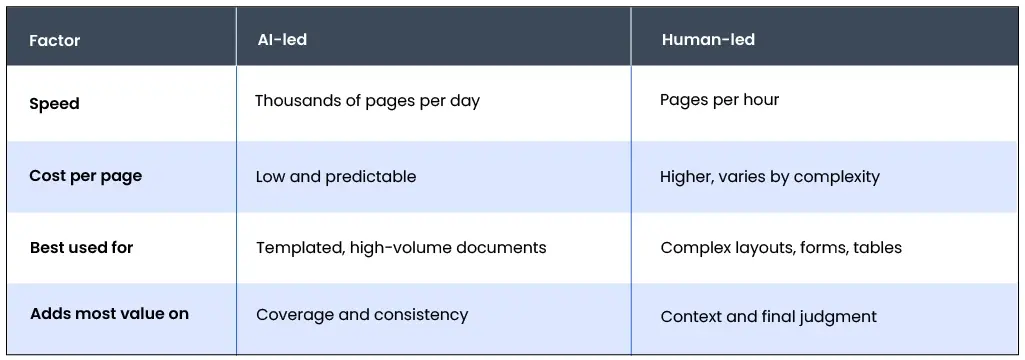
For a full breakdown, see our comparison of AI vs. manual document remediation, including where the crossover point sits by document type.
How hybrid AI and human review close the gap
The hybrid model follows the Matterhorn split almost exactly. Software settles the conditions it can determine alone, and the ones that rely on context go to a human specialist. This is how credible PDF accessibility services are built now, Documenta11y included. Every document runs through automated remediation first, then validation against PDF/UA and WCAG, then a specialist review of the conditions that require context: whether the alt text conveys the point, whether the reading order makes sense, whether table headers land on the right cells. Nothing from Documenta11y carries a conformance claim until a person has signed it off.
Software does the volume. Specialists confirm the meaning. Neither is doing the other’s job.
Can AI assist in maintaining PDF accessibility over time?
Yes, AI can help maintain PDF accessibility over time, and this is where it earns its keep quietly. Every upload and template change is a fresh opportunity to push out something inaccessible, and checking every file by hand forever is simply not sustainable. AI takes the ongoing layer: scanning libraries for regressions, catching uploads before they go live, applying an approved or updated template’s rules to everything built from it, and keeping a dated record of what was checked and when. Set that up once, and document accessibility stops being a fire drill and becomes a smooth routine.
The short version
AI closed the volume problem, and keeps steadily gaining ground on the judgment problem. Software settles 87 of the 136 conformance conditions; the other 47 are where a specialist adds context, and a program that plans ahead for both leverages what neither could do alone.
Frequently Asked Questions
1. Can AI automatically tag PDF content for accessibility?
Yes, and it handles headings, paragraphs, and simple lists well, with tables and forms improving steadily. Auto-tagging gets you a tag tree, and a review pass confirms the tree says what the document means.
2. Which AI tools help create accessible PDF documents?
Three categories: checkers that only test, remediation tools that tag and fix, and end-to-end PDF accessibility remediation services that pair AI with human review, ADAPT AI among them. Test any of them on your most complex file, not your simplest.
3. How does AI facilitate accessible content creation in PDFs?
By moving the work upstream, checking source files in Word, InDesign, or a CMS before building the PDF in the first place, back when a missing heading style is still cheap to fix.
4. What should small business owners know about making PDFs accessible with AI?
1. Your documents fall under the same laws as your website.
2. AI has made remediation affordable at small volumes.
3. A passing automated report is strong evidence, and a human sign-off is what authorizes it to become a conformance claim.
 Can AI Make PDFs Accessible? Detection, Remediation, and Where Humans Still Matter
 In-House vs. Outsourced Document Remediation: Costs, Risks, and How to Choose
 Automated vs. Manual Document Remediation