Why Document Accessibility Partners Matter More Than Ever
As accessibility expectations have become clearer, many teams have learned that quick fixes and basic tools do not really solve the problem. Documents vary in structure, volume, and complexity, and accessibility work tends to fall apart when it is handled file by file. That is why more organizations are turning to specialists who work on document accessibility every day and know how to make content usable and dependable across formats, not just technically compliant.
Below is an assessment of document accessibility companies based on practical capability, standards alignment, and organizational fit.
How We Evaluated Document Accessibility Companies
Choosing a document accessibility partner requires more than a surface level review of services offered. Not all providers bring the same level of depth or consistency to accessibility work. Some are built to scale over time, while others struggle as document volume and complexity increase. To keep the comparison grounded, each company here was reviewed using the same practical criteria based on real accessibility work.
We paid attention to what each company actually does day to day, the kinds of documents they work with, and how they keep up with current WCAG requirements. We also looked at whether their work can fit into larger content workflows, since that matters once accessibility becomes ongoing. Details like turnaround time and the industries they work with were considered too, because those often show whether a provider can support accessibility over time or only handle occasional fixes.
Top 10 Document Accessibility Companies Overview for 2026
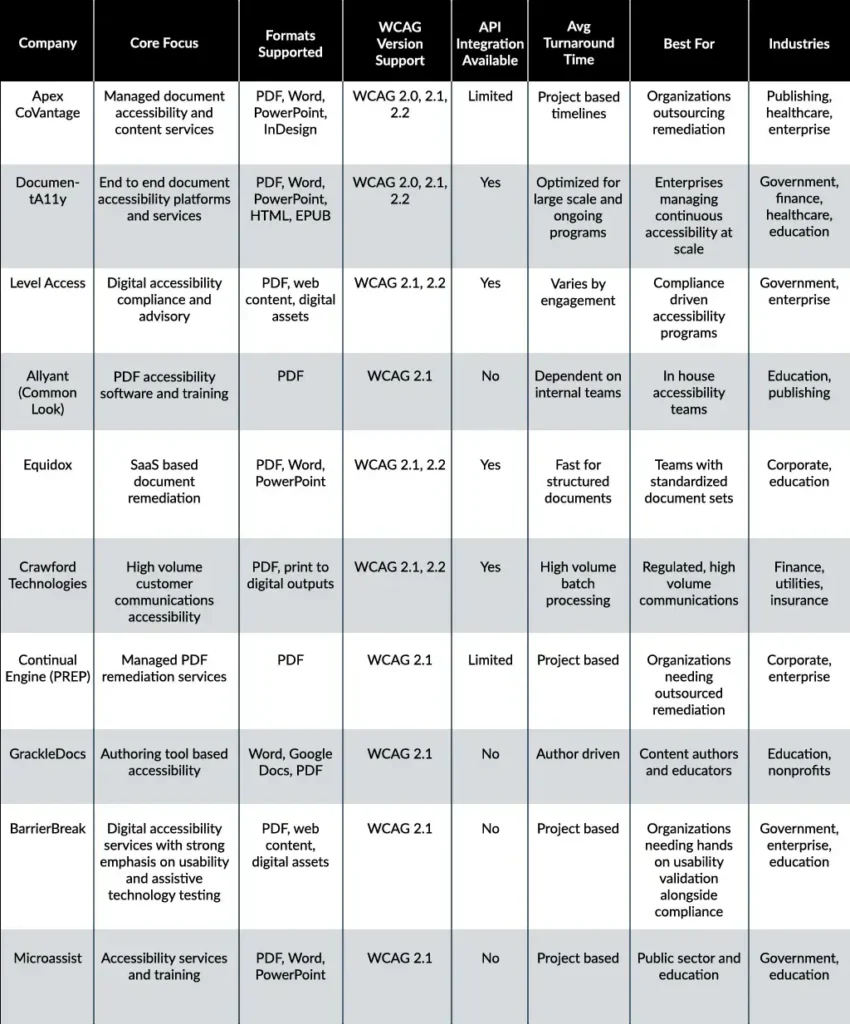
1. Apex CoVantage
Focus:
Hybrid intelligence driven document accessibility delivered through a combination of automation and experienced human teams.
Key Capabilities:
Apex CoVantage supports document accessibility across PDFs, Office files, and complex legacy content using a services led model. With 38 plus years of experience managing content and data at scale, the company applies AI supported workflows alongside trained accessibility specialists. Capabilities include document remediation, accessibility audits, assistive technology testing, and quality assurance processes designed to support large, regulated content environments.
Unique Value Proposition:
Apex CoVantage is trusted by organizations that need document accessibility handled with consistency and operational discipline. Its experience in large scale content services brings structure and reliability to accessibility work, while the hybrid intelligence approach helps maintain quality as volumes increase. This makes it a strong fit for teams looking for a dependable delivery partner rather than a standalone tool.
2. DocumentA11y
Focus:
On-demand document accessibility designed to make remediation convenient, scalable, and dependable over time.
Key Capabilities:
Centralized remediation workflows that support PDFs, Word, PowerPoint, Excel, and other formats, with built-in quality controls, expert accessibility validation, and audit-ready outputs aligned with Section 508, ADA, EAA, WCAG and PDF/UA. Designed to manage complex documents, legacy files, and ongoing accessibility needs without breaking existing content operations.
Unique Value Proposition:
DocumentA11y simplifies document accessibility for organizations that need consistency and reliability, not one-off fixes. Its platform model allows teams to remediate documents as needed, track progress centrally, and scale accessibility work without disrupting existing content workflows. Its on-demand model supports long-term accessibility programs rather than one-time fixes. This approach has earned the trust of higher education institutions, including Ivy League universities, as well as organizations managing high-volume, compliance-driven content.
3. Level Access
Focus:
Document accessibility delivered as part of a broader accessibility compliance and governance program.
Key Capabilities:
Level Access supports document accessibility through standards interpretation, risk assessment, and policy alignment within enterprise accessibility programs. Its services are typically positioned alongside broader digital accessibility efforts, helping organizations understand regulatory requirements, manage compliance risk, and align document accessibility practices with internal governance and reporting structures.
Unique Value Proposition:
Level Access is well suited for organizations that approach document accessibility as one component of a larger compliance and governance strategy. Rather than focusing solely on document remediation workflows, it supports teams that prioritize oversight, policy consistency, and long-term risk management across digital accessibility initiatives.
4. Allyant (Common Look)
Focus:
Software based PDF accessibility and training designed for in house teams.
Key Capabilities:
CommonLook provides PDF remediation software that allows internal teams to tag, structure, and fix accessibility issues directly. Its offerings also include formal training and certification programs that help teams build internal knowledge of PDF accessibility requirements and remediation techniques. This approach gives organizations hands on control over how accessibility work is completed.
Unique Value Proposition:
CommonLook is best suited for organizations that already have internal resources and want to manage PDF accessibility independently. By combining tools with structured training, it supports teams that prefer direct control over workflows rather than relying on external remediation services.
5. Equidox
Focus:
SaaS based document accessibility designed for structured and repeatable content
Key Capabilities:
Equidox offers a cloud based platform for document remediation that works best with standardized layouts and predictable document structures. It supports common document formats and enables faster processing when templates and formatting remain consistent across files. The platform is typically used by teams handling routine document production rather than highly complex or irregular content.
Unique Value Proposition:
Equidox is a practical option for organizations that rely on consistent document templates and want a quicker remediation process for repeatable content. It is best suited for teams where document structure is controlled and variation is limited, allowing efficiency to be gained through standardization.
6. Crawford Technologies
Focus:
Document accessibility for high volume and transactional customer communications.
Key Capabilities:
Crawford Technologies supports accessibility for large scale document outputs such as statements, notices, bills, and customer communications. Its solutions are designed for batch processing and integrate with both print and digital production workflows. The company works closely with regulated industries where consistency, accuracy, and repeatability are critical across high document volumes.
Unique Value Proposition:
Crawford Technologies is best suited for organizations operating in regulated, high volume document environments. Its strength lies in handling transactional content at scale, where accessibility must be applied reliably across millions of documents without disrupting established production systems.
7. Continual Engine (PREP)
Focus:
Managed PDF accessibility remediation delivered through external services.
Key Capabilities:
Continual Engine provides outsourced PDF remediation through project based delivery models. Its services focus on producing standards-aligned accessible documents without requiring organizations to build internal accessibility teams. In addition to managed services, the company also offers software based remediation tools for teams that want limited in-house involvement alongside external support.
Unique Value Proposition:
Continual Engine is suitable for organizations that prefer to rely on external remediation support rather than internal tooling or workflows. Its mix of managed services and software options offers flexibility for teams that need accessibility work completed but do not plan to manage remediation as an ongoing internal function.
8. GrackleDocs
Focus:
Authoring level document accessibility integrated into content creation.
Key Capabilities:
GrackleDocs provides accessibility tools that work within Microsoft Word and Google Docs, allowing content creators to address accessibility issues as documents are written. The platform offers guidance for authors, built in accessibility checks, and feedback that helps reduce common structural issues before documents are exported or shared.
Unique Value Proposition:
GrackleDocs supports organizations that want to introduce accessibility earlier in the content lifecycle. By focusing on authoring stage checks, it helps reduce downstream remediation effort, particularly for teams producing large volumes of new documents using common authoring tools.
9. BarrierBreak
Focus:
Enterprise digital accessibility consulting, remediation, and compliance solutions.
Key Capabilities:
BarrierBreak provides end-to-end accessibility services, including accessibility audits, document remediation, web and application testing, VPAT/ACR creation, and accessibility training. Their services cover PDFs, websites, mobile apps, software platforms, and eLearning content. They combine automated testing with manual expert evaluation to ensure compliance with WCAG, ADA, Section 508, and other global accessibility standards.
Unique Value Proposition:
BarrierBreak positions itself as a strategic accessibility partner rather than just a remediation vendor. With deep domain expertise and accessibility subject matter experts, they help organizations build long-term compliance frameworks, improve inclusive user experiences, and reduce legal risk. Their consultative approach supports enterprises looking for scalable, standards-aligned accessibility transformation.
10. Microassist
Focus:
Accessibility services supported by training and advisory guidance.
Key Capabilities:
Microassist provides document accessibility remediation alongside accessibility training and compliance guidance. Its work is often focused on public sector bodies, education institutions, and organizations that need help understanding accessibility requirements while improving document usability. Services typically combine practical remediation with advisory support to help teams build foundational accessibility knowledge.
Unique Value Proposition:
Microassist is a good fit for organizations that are developing internal accessibility capability and need ongoing guidance in addition to remediation. Its emphasis on training and advisory support makes it suitable for teams that want to strengthen internal understanding while meeting accessibility requirements over time.
Choosing the Right Document Accessibility Partner
The right document accessibility partner should match your document volume, content complexity, and long term accessibility goals. Look beyond basic remediation and assess how consistently quality is maintained as content scales.
Strong partners combine assistive technology testing with human review and offer clear ways to validate results. Running a small pilot before committing helps confirm fit, reliability, and overall approach.
Document Accessibility as a Long-Term Capability
Document accessibility has become a practical requirement for how information is shared, used, and trusted. The choice of partner plays a direct role in whether accessibility efforts remain reactive or develop into a stable, repeatable process. Different providers serve different needs, from authoring support to large scale remediation, and the right fit depends on document volume, formats, and internal capability.
Choosing the right formats also matters. Word, PDF, and HTML each serve different purposes based on audience, distribution, and reuse. Aligning format decisions with accessibility goals reduces rework and improves reach. Organizations that address accessibility early protect usability, consistency, and long term reliability as content demands grow.
 How Often Should You Audit Your Website for Accessibility (2026 Guide)
 8 Best Practices for Creating Accessible PDFs in InDesign
 WCAG 3.0 Working Draft: What Accessibility Teams Need to Know