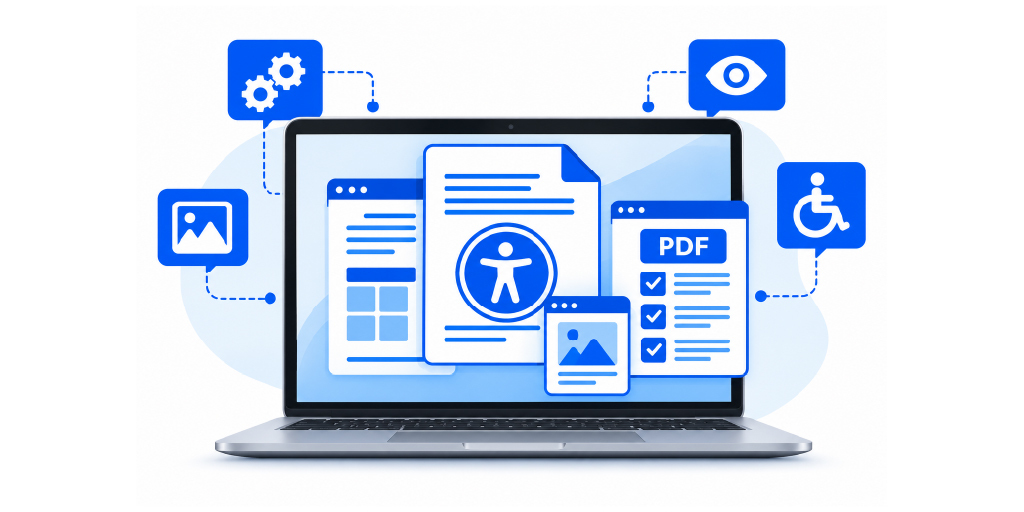
The right PDF remediation software depends on what your organisation needs to remediate, how many documents it handles, and how much control it needs over the remediation process. Accessibility and compliance teams may need support for complex tables, forms, scanned documents, and structured layouts, while organisations with large document libraries may also need bulk processing, automation, and validation capabilities.
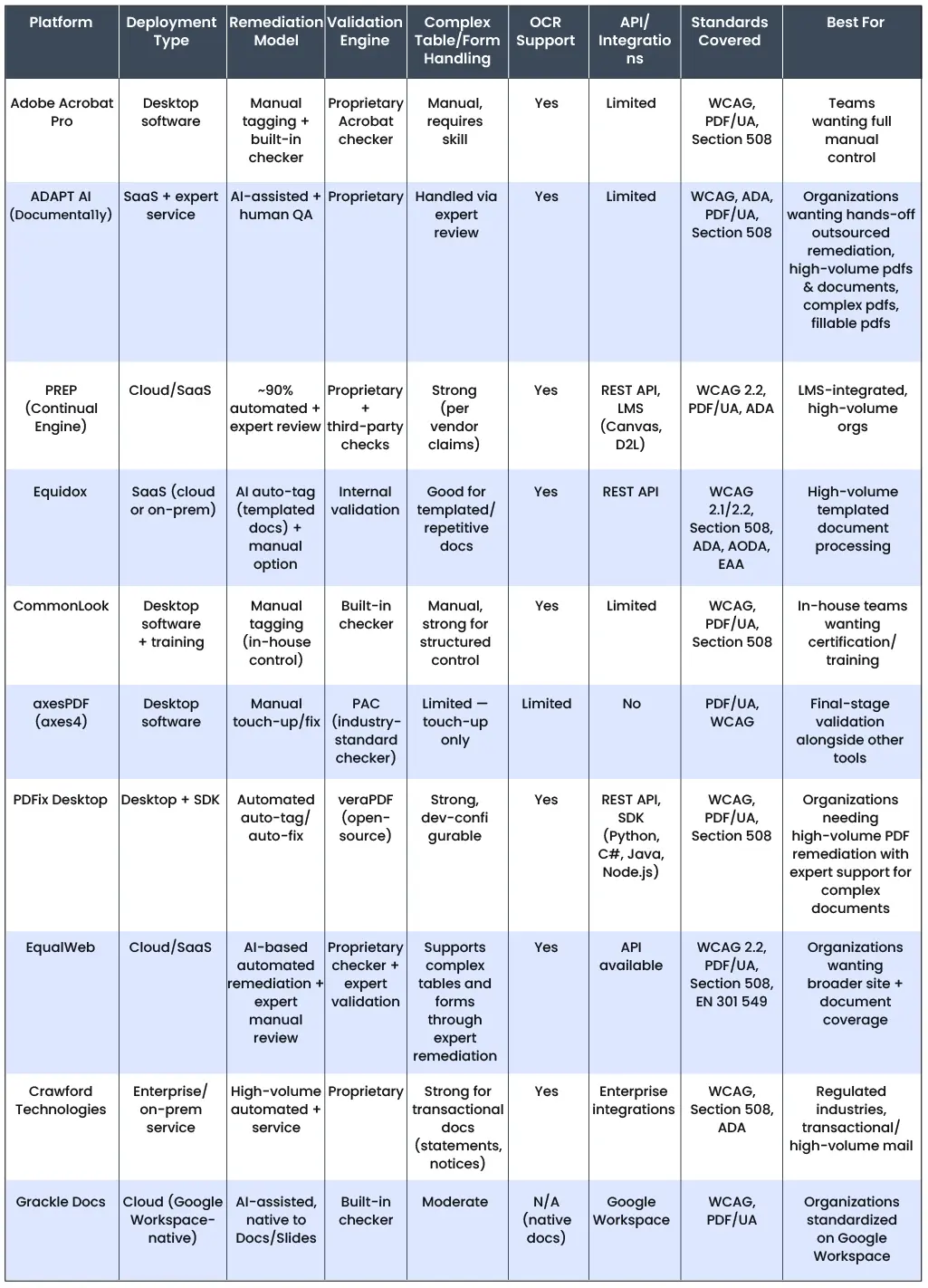
This comparison looks at 10 leading PDF remediation platforms and how they handle the parts of remediation that tend to require the most work. We consider their approach to remediation, how the finished PDF is checked, and the types of documents and teams each platform is suited to.
Best PDF Remediation Software and Platforms Overview for 2026
1. Adobe Acrobat Pro
About the Platform & Focus
Adobe Acrobat Pro remains one of the more established options for hands-on PDF accessibility remediation. It gives accessibility professionals direct access to the tag tree, reading order, document properties, form fields, and other parts of the PDF structure that often need individual attention.
Key Capabilities
Acrobat Pro can automatically tag PDFs, adjust reading order, add alternate text, create and label form fields, set tab order, and work with scanned documents through OCR. Its Reading Order tool also provides controls for headings, figures, tables, form fields, and decorative content. Adobe’s current cloud-based auto-tagging can identify headings, lists, tables, scanned text, and reading order in multicolumn layouts.
Verification & Complex Content
Acrobat includes its own Accessibility Checker and reports potential issues that need attention. It also explicitly notes that logical reading order needs to be verified manually. Complex tables, irregular layouts, closely spaced columns, and complicated forms can still require work in the Tags panel after automatic tagging.
What Makes It Stand Out
The main strength of Acrobat Pro is control. When automatic tagging gets a difficult page wrong, the remediator can work directly with the structure rather than treating the output as fixed. That makes it particularly useful for accessibility professionals handling individual or moderately sized remediation projects where detailed manual correction is part of the job.
2. ADAPT AI (Documenta11y)
About the Platform & Focus
ADAPT AI is automated PDF remediation software developed by Apex CoVantage and integrated with the Documenta11y platform. It is designed for organisations managing large volumes of documents, rather than remediating files one at a time. The platform combines automated document analysis and remediation with accessibility expertise, covering assessment, remediation, validation, and expert review within a single workflow.
Key Capabilities
ADAPT AI uses Vision AI models to identify and classify objects within a PDF, including headings, tables, figures, mathematics, lists, and other document elements. Each object classification is verified using an alternative model to increase confidence in the identification. This additional verification is useful for complex layouts where, for example, a list may visually resemble a combination of paragraphs and list items.
The platform can perform OCR for text, tables, and mathematical content when required. It also supports handwritten text OCR, with reported accuracy of 80–90%. Once the document elements are identified, ADAPT AI can tag tables of contents, headings, text, tables, mathematics, and figures using trained models.
ADAPT AI can also generate alt text for images and establish the reading order and structural information needed for an accessible PDF. The remediation process rewrites the required code into the PDF to preserve its structure and produce an output designed to pass Adobe Accessibility Checker.
Documenta11y also supports PDF forms, OCR-based remediation, alt text, and structural corrections as part of its broader remediation workflow.
Verification & Complex Content
Automation handles the first pass, but the workflow does not stop there. Documents are checked through automated validation and reviewed by accessibility specialists, with attention to areas such as reading order, alt text, tables, forms, and other elements where context matters.
ADAPT AI’s output can be checked using tools such as Adobe Accessibility Checker and PAC 2026. Where PAC 2026 identifies issues that require further refinement, Apex provides its PDF Accessibility Editor as a complimentary tool for human correction and refinement. This combination of automated processing, validation, and human review provides a path for addressing issues that automated remediation alone may not resolve.
What Makes It Stand Out
ADAPT AI is built around a different problem from a desktop remediation editor: how to deal with high document volumes without treating every file as a completely manual project. Its object classification, secondary verification, OCR, automated tagging, alt-text generation, and structural remediation capabilities are designed to handle much of the repetitive work involved in preparing complex PDFs.
That makes it particularly relevant to publishers, enterprises, and organisations with large or recurring PDF remediation requirements, where automated processing can take on the repetitive work while specialists handle the decisions that still require judgment.
3. PREP (Continual Engine)
About the Platform & Focus
PREP is a cloud-based remediation platform from Continual Engine. It is aimed at organizations that need to work through large collections of PDFs rather than remediate every file from scratch.
Key Capabilities
PREP automatically identifies document zones, reading order, and tag structure, with support for headings, lists, tables, forms, and scanned documents through OCR. Teams can review the generated structure and make manual corrections where needed.
Verification & Complex Content
The platform includes an accessibility checker and screen reader preview, along with reporting for WCAG and PDF/UA requirements. Its handling of complex tables, nested lists, scanned files, and forms makes it particularly relevant to organizations working with varied document collections.
What Makes It Stand Out
PREP is particularly suited to organisations working with recurring document types or documents that follow consistent layouts, where automated processing can be applied across similar files. PREP sits between fully manual remediation and large-scale automated processing. Its cloud-based setup, collaboration features, APIs, and support for bulk processing make it a practical option for publishers, higher education institutions, and other organizations managing substantial PDF libraries.
4. Equidox
About the Platform & Focus
Equidox is a cloud-based PDF remediation platform built around a visual, zone-based approach. Instead of working mainly through a PDF tag tree, users can work directly with areas of the page and set how each section should be read.
Key Capabilities
It uses automated detection for text, headings, lists, and tables, with OCR available for scanned documents. Tables can be adjusted manually when the automatic detection gets the rows, columns, or merged cells wrong. It also supports accessible PDF forms, including field tooltips and different form field types.
Verification & Complex Content
Equidox provides an HTML preview so users can see how the document structure will be interpreted, along with output warnings for machine-detectable issues. These checks may not identify every accessibility issue, so the company also recommends checking the finished PDF with a screen reader to verify how the document works with assistive technology
What Makes It Stand Out
The zone-based interface is the main difference. For someone who finds working directly in a PDF tag tree cumbersome, Equidox offers a more visual way to deal with reading order, tables, lists, and other page elements. It also has Equidox AI for batch processing of recurring, template-based documents such as statements and reports.
5. CommonLook
About the Platform & Focus
CommonLook PDF is built for accessibility professionals who need to remediate and verify PDFs in detail. It is available as a browser-based tool as well as an Adobe Acrobat plug-in, and supports standards including WCAG, PDF/UA, and Section 508.
Key Capabilities
The platform works with document tags, reading order, lists, links, tables, and forms. Its table editor is particularly useful for fixing header cells, cell scope, and more complicated table structures. For scanned PDFs, OCR is generally handled before the file is brought into CommonLook.
Verification & Complex Content
CommonLook has its own verification tools and produces reports against the selected accessibility standard. Users can also work through individual issues in the structure editor rather than relying only on an overall pass or fail result. Since automated validation primarily identifies technical and structural issues, additional manual review may still be needed to confirm how the finished PDF works for users of assistive technology.
What Makes It Stand Out
CommonLook is especially suited to remediators who want detailed control over the PDF structure. Its tools for tables, lists, and verification are a strong part of the platform, although some content preparation, such as OCR and creating form fields, may still need to be done in Acrobat.
6. axesPDF
About the Platform & Focus
axesPDF is a desktop tool for checking and fixing accessibility issues in PDFs. It is mainly aimed at people who already work with PDF files and need more control over the structure and the final accessibility checks.
Key Capabilities
The tool lets users work directly with tags, logical structure, content, links, and document settings. It can also fix a range of PDF/UA issues with one-click actions. The latest version adds AI-assisted checks for elements such as headings, paragraphs, lists, tables, figures, and notes.
Verification & Complex Content
axesPDF has its own PDF/UA and WCAG checker, along with a screen reader preview that shows the content in the order assistive technology would encounter it. Its AI checks can flag some issues that normally require human review, but axes4 still treats those results as supporting information rather than a replacement for the final assessment.
What Makes It Stand Out
axesPDF is particularly useful when the difficult part of a remediation job is the final cleanup. It works well alongside tools such as Acrobat, Word, or InDesign, giving remediators a way to find and correct problems in the tagged PDF before delivery.
7. PDFix Desktop
About the Platform & Focus
PDFix Desktop is a desktop application for working directly with PDF structure and accessibility. It is aimed at users who need to inspect, edit, and validate PDFs rather than relying entirely on automated remediation.
Key Capabilities
Users can work with PDF tags, document structure, metadata, links, and other accessibility properties. PDFix also supports document conversion and can preserve accessibility information during those transformations.
Verification & Complex Content
PDFix includes accessibility checking and lets users make corrections within the application. Its conformance documentation covers WCAG and PDF accessibility requirements, while the editing tools allow individual issues to be addressed rather than simply reported.
What Makes It Stand Out
PDFix is a good option for teams that want remediation and checking in the same desktop environment. It also goes beyond basic PDF editing, with tools for processing and converting documents where accessibility information needs to be retained.
8. EqualWeb
About the Platform & Focus
EqualWeb approaches PDF accessibility as a complete workflow that combines automated checking, AI-based remediation, expert manual remediation, and accessible document delivery. Its PDF Tools are designed for organisations managing PDFs at scale, with support for government, finance, education, and other teams handling large document volumes.
Key Capabilities
EqualWeb’s PDF tools can build or repair tag structures, establish reading order, add alt text, structure tables and lists, label form fields, and address fonts, text encoding, colour contrast, language, and metadata. Scanned PDFs can be processed through OCR, while batch processing supports up to 1,000 PDFs at a time. EqualWeb also provides an API for organisations that want to integrate PDF accessibility checks and remediation into their own systems and workflows.
Verification & Complex Content
EqualWeb’s PDF Checker runs more than 80 automated checks and provides an accessibility score and detailed report. Remediated files are automatically re-audited, while complex documents can be passed to certified accessibility experts for manual remediation and screen-reader testing. EqualWeb itself notes that an automated score does not by itself confirm compliance, particularly for complex tables, nuanced reading order, and context-specific alternative text, where human review is still required.
What Makes It Stand Out
EqualWeb combines automated PDF remediation with a human remediation option within the same platform. This makes it relevant to organisations that need to process PDFs at scale while retaining an option for expert handling of complex documents. Its accessible viewer and API also extend the platform beyond standalone PDF remediation into document delivery and integration with existing systems.
9. Crawford Technologies
About the Platform & Focus
Crawford Technologies takes a broader approach than a single PDF editing tool. Its AccessibilityNow platform includes separate tools for automated tagging, remediation, validation, website scanning, and high-volume document workflows.
Key Capabilities
AccessibilityNow Remediate is a Windows desktop tool for working on static PDFs, with controls for reading order, headings, lists, URLs, and tables. For larger automated workloads, AccessibilityNow Publisher can tag documents through workflows, RPA, or APIs. The platform also supports scanned documents through OCR.
Verification & Complex Content
Validation is handled through AccessibilityNow Validator, while Remediate also has the Validator built in so users can check a document while working on it. Crawford Technologies also supports tables, lists, forms, OCR, and other elements that commonly need attention in more complicated PDFs.
What Makes It Stand Out
Crawford Technologies is particularly relevant when PDF accessibility is part of a much larger document operation. Its tools cover everything from individual PDF remediation to automated processing of recurring or transactional documents, so it can fit into workflows where thousands or more files need to be handled rather than just a few PDFs at a time.
10. Grackle Docs
About the Platform & Focus
Grackle PDF is a browser-based tool for remediating PDFs without requiring users to work directly in a complex tag tree. It automatically tags the document and creates reading order and structure, with an editor for making changes before export.
Key Capabilities
The platform can identify headings, tables, lists, and images, and it provides tools for adjusting reading order and adding alt text. Grackle also offers a desktop version for users who need more detailed control over tagging and manual remediation.
Verification & Complex Content
Grackle PDF is focused more on getting a document into an accessible state than on acting as a formal compliance certification tool. For deeper checking, Grackle PDF Desktop provides verification and reporting tools. The platform also has separate products for PDF accessibility testing and high-volume document processing.
What Makes It Stand Out
Grackle is easier to approach than some of the more technical PDF remediation tools. The browser-based workflow is suited to people who need to fix PDFs occasionally without becoming experts in PDF tags, while the desktop and high-volume options give organizations a path to more involved remediation work.
How We Evaluated These Platforms
The platforms in this list were compared based on the core tasks involved in PDF remediation, including tagging, reading order, tables, forms, scanned documents, OCR, and accessibility validation. We also looked at the level of control each platform provides, from hands-on remediation and manual corrections to automated processing and support for large document volumes.
Validation was another key consideration. Automated checkers can identify technical issues, but a passing result does not necessarily confirm that a PDF is usable with assistive technology. The comparison therefore considers how each platform checks the finished document and whether it supports additional review where automated checks alone may not be enough.
What to Look for Before You Choose
The best choice depends on what happens after you upload a real document. A tool may look strong in a demo but leave too much cleanup when the PDF contains tables, forms, scanned pages, or an unusual layout.
Test your shortlisted platforms with the documents your team actually handles. Look at the remediation output, how much you still have to fix by hand, and what the validation results show. If you are dealing with a high volume of PDFs, check how well the tool handles batch processing and integrations, and how much human review is needed before a file is ready.
The goal is not to find the tool with the most features. It is to find PDF remediation software that produces accessible documents your team can trust, at a volume and level of effort your workflow can actually sustain.
 Top 10 PDF Remediation Software and Platforms (2026)
 Accessible Canada Act Deadline: What Happens If You Miss It
 How PDF Remediation Services Handle Complex Layouts