
The Appeal of the Accessibility Shortcut
What if website accessibility could be improved by adding a single line of JavaScript? That’s the promise accessibility overlays have marketed for years. For organizations managing large websites, legacy content, and limited accessibility resources, the idea is understandably appealing. But how close is that promise to reality?
A website may contain hundreds of pages, years of accumulated content, third-party tools, downloadable documents, and code that has changed hands multiple times. Against that backdrop, it’s easy to see why the accessibility overlay market gained traction. Many vendors position overlays as a quick route to accessibility: deploy a single line of code, avoid major redevelopment, and move forward with minimal disruption. For organizations facing tight budgets, limited internal resources, or large volumes of legacy content, those promises can be hard to ignore.
The appeal is understandable. The larger question is whether accessibility can truly be added after a website is built, or whether some barriers need to be addressed at the source.
What Is an Accessibility Overlay and What Does It Actually Do?
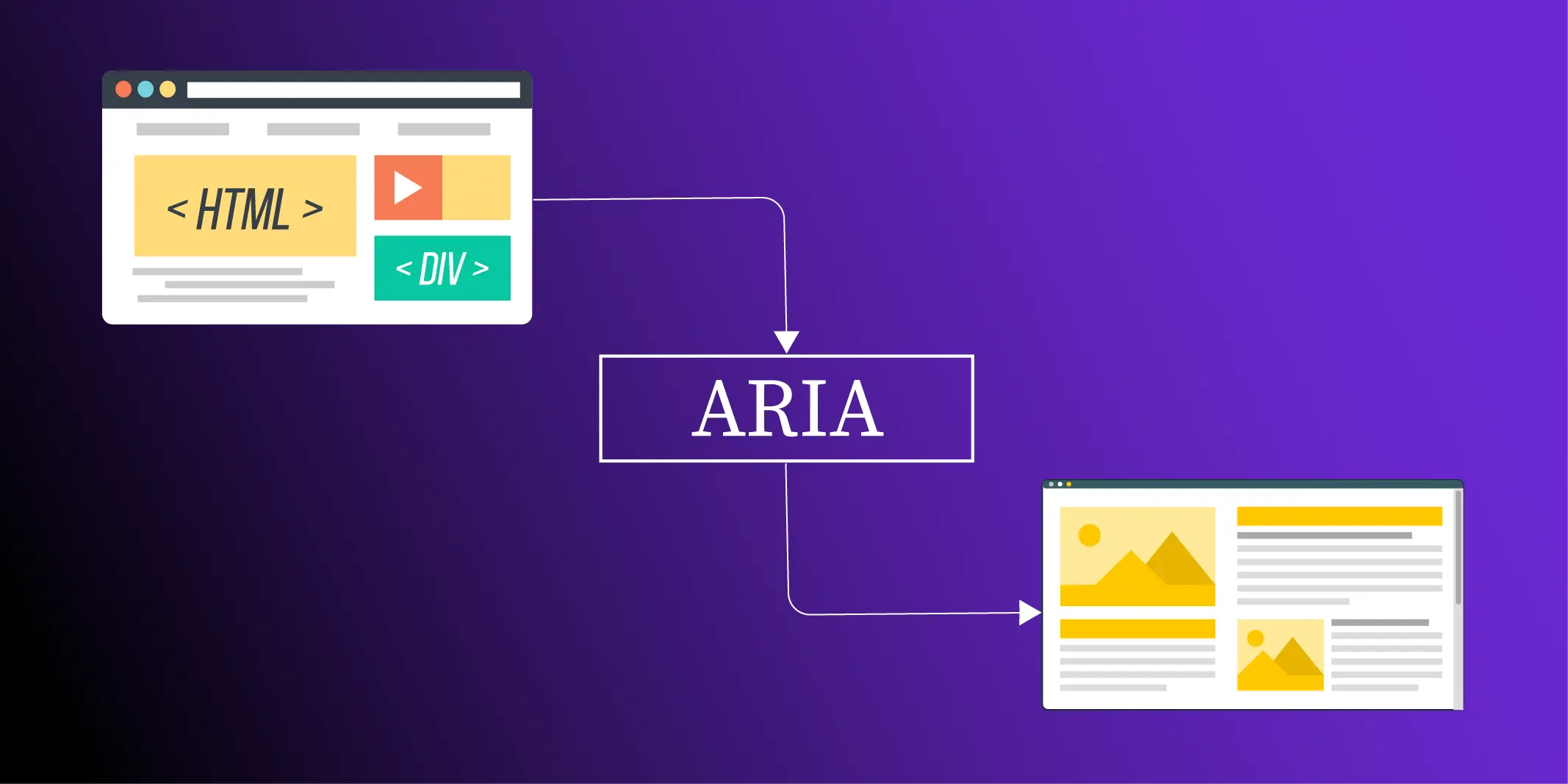
An accessibility overlay is a third-party script or widget added to a website, usually through JavaScript, that sits on top of the page and provides accessibility-related controls and adjustments without requiring changes to the site’s underlying code.
Most overlays are relatively straightforward to deploy. Once installed, they typically offer options such as text resizing, color contrast adjustments, link highlighting, keyboard focus indicators, reading assistance, and animation controls. These are the features users notice first because they can be activated directly from the page.
For some users, these options can make a website easier to read or navigate. The distinction that often gets overlooked is that customization and remediation are not the same thing. An overlay changes how content is presented. It does not usually modify the underlying code, content structure, form labels, image descriptions, or other elements that determine whether a website is accessible in the first place.
That difference is central to the discussion. Overlays generally operate on top of a website, while accessibility remediation focuses on addressing barriers within the website itself.
Do Accessibility Overlays Make a Website Fully Accessible?
Accessibility isn’t an all-or-nothing outcome, which is one reason overlay discussions can become so polarized. In practice, overlays can be useful in certain situations and for certain users. The challenge is understanding where their capabilities end and where broader accessibility work begins.
Where Accessibility Overlays Can Help?
Accessibility Overlays can provide additional customization options that allow users to adjust how content is presented. Features such as text resizing, contrast controls, animation settings, and reading assistance may improve usability for some visitors. They can also offer a relatively quick starting point for organizations that are beginning to address accessibility and looking for immediate user-facing improvements.
Where Accessibility Overlays Typically Fall Short?
The limitations of accessibility overlays become clearer once an audit moves beyond the homepage and into the underlying code. Most accessibility barriers are not visual settings that can be adjusted after a page loads. They stem from the way pages are built, how content is structured, and how interactive components communicate with assistive technologies. Changing colours, increasing text size, or adding reading tools may improve the experience for some visitors, but those controls do not alter the HTML, repair broken interactions, or rewrite inaccessible content.
Take an online checkout form as an example. A screen reader depends on programmatically associated labels to identify each input field. If those labels are missing or incorrectly implemented, the form becomes confusing to navigate, regardless of whether an overlay is present. The same applies to informative images without meaningful alternative text. An overlay may attempt to generate descriptions, but it cannot reliably determine the author’s intent or the role an image plays within the surrounding content. Those decisions require changes to the content itself, not an additional layer running in the browser.
The same pattern appears in more complex interfaces. A modal dialog that fails to move keyboard focus when it opens, or traps users inside the dialog, remains inaccessible because the underlying interaction has not changed. Likewise, a navigation menu built without proper semantic markup or keyboard support continues to create barriers for users who cannot rely on a mouse. These are implementation issues, and they can only be resolved where the code is written and maintained.
This distinction is central to WCAG conformance. The Web Content Accessibility Guidelines evaluate whether content, structure, and functionality are accessible to people using a wide range of assistive technologies. Interface-level controls can complement that experience for some users, but they cannot substitute for accessible code, meaningful content, or correctly implemented interactions. That is why manual website accessibility remediation remains the foundation of long-term accessibility, even when organisations choose to offer additional user preference tools.
Do Accessibility Overlays Help Screen Reader Users?
Sometimes, but results vary depending on the overlay, the screen reader, and the website itself.
This is where the discussion becomes more complicated. Screen readers already provide extensive navigation and accessibility controls, and some overlay features may duplicate functionality that users already rely on. Concerns around accessibility overlay screen reader problems and conflicts with assistive technologies often stem from situations where an overlay changes expected behaviour or interferes with existing user settings.
Experiences vary across browsers, assistive technologies, and individual websites, which is why accessibility should ultimately be validated through testing with assistive technology users.
Can an Accessibility Overlay Make PDFs, Forms, and Downloadable Documents Accessible?
Generally, they do not. Accessibility overlays are designed to affect how web pages are displayed in the browser. They typically do not remediate downloadable files such as PDFs, Word documents, PowerPoint presentations, or spreadsheets. If these documents are missing tags, proper reading order, alternative text, descriptive headings, or other accessibility features, those issues remain unchanged.
The same applies to forms and other downloadable resources linked from a website. Making these assets accessible requires remediation within the document itself rather than an overlay applied to the website. Organizations that publish reports, policies, forms, course materials, or other documents should treat document accessibility as a separate part of their overall accessibility strategy.
Does It Matter If a Website Was Built Using AI Tools?
Not necessarily. A website becomes accessible because people make accessibility a priority throughout the process, not because of the tool used to build it. The rise of AI website builders has introduced a new question: is an AI-generated website accessible by default? The answer depends more on how it was built than on how it was created.
A website created with AI can still include many of the same accessibility issues seen on any other website. Forms may be difficult to complete, headings may be inconsistent, navigation may not work well with a keyboard, or important content may be hard for assistive technologies to interpret. AI can speed up development and even help identify some accessibility issues during the build process, but it cannot determine whether the entire user experience is accessible. That still requires manual review, testing with keyboards and assistive technologies such as screen readers and magnifiers, and validation by people who understand how users interact with digital content.
The method may be new, but the accessibility expectations are not. A website built with AI is still a website. People still need to navigate it with a keyboard, complete forms, understand the content, and use it with assistive technologies. The only reliable way to know whether that experience works is to test it, review it, and validate it against accessibility requirements.
What Actually Works: Overlays, Manual Remediation, or Both?
By this point, the question is probably less about whether overlays are good or bad and more about where they fit. Some organizations use them to offer display and customization options. Others focus their efforts on fixing accessibility issues within the website itself. Many end up doing some combination of both.
The difference comes down to what is being changed. An overlay typically sits on top of existing content, while remediation focuses on the barriers already built into the website.
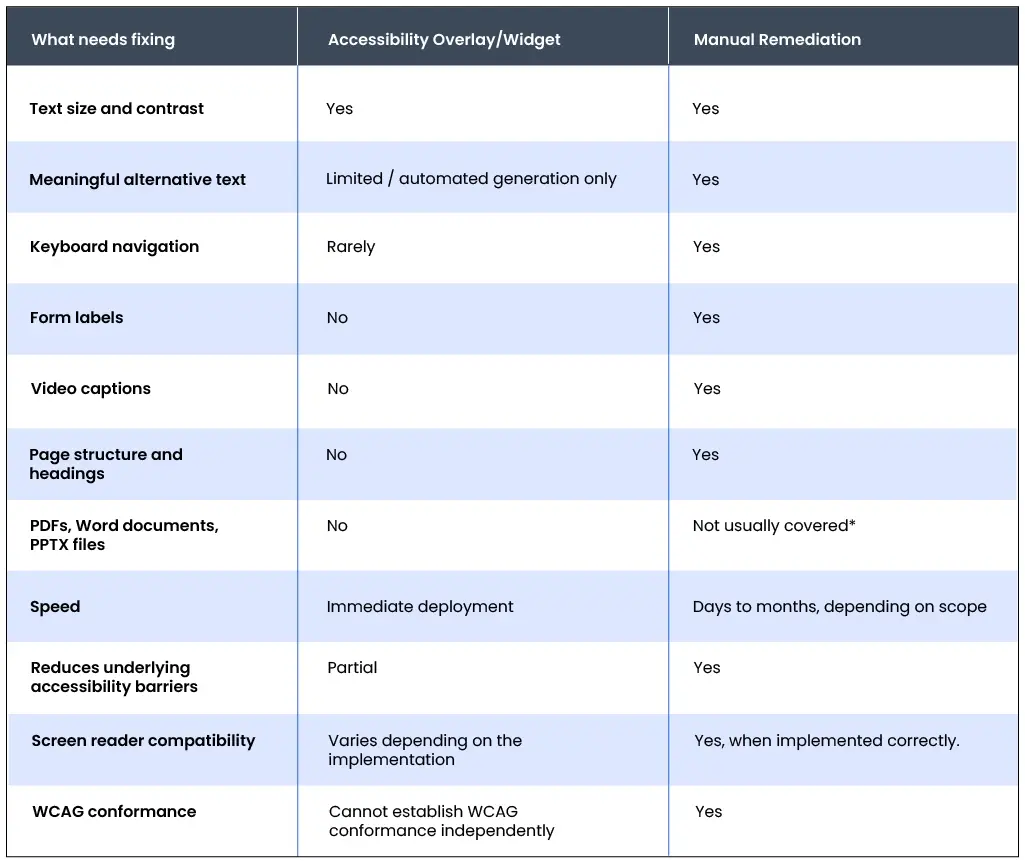
The comparison below shows where those approaches differ and what each is designed to address.
Accessibility Overlays vs. Manual Remediation: A Comparison
What the Accessibility Community Has Been Saying
The discussion around accessibility overlays is nothing new, but a series of developments in 2025 brought the issue back into focus. The Federal Trade Commission’s action against AccessiBe over alleged deceptive advertising claims prompted fresh discussion across the accessibility community. At the same time, the updated Overlay Fact Sheet continued to be widely referenced by accessibility professionals, disability advocates, developers, and assistive technology users.
Many of the concerns raised today are the same ones that have been discussed for years. Critics point to potential conflicts with assistive technologies, added navigation complexity, compliance claims that may exceed what the technology can realistically deliver, and the fact that underlying accessibility barriers may remain untouched. At the same time, some users appreciate the additional customization features overlays provide.
The debate persists because user preference tools and accessibility compliance solve different problems. One may help users adjust how a page is presented. The other requires barriers to be identified, tested, and addressed within the content, code, and user experience itself.
Accessibility Starts with the Website, Not the Widget
The appeal of accessibility overlays is easy to understand. Every organization wants accessibility efforts to move faster, especially when legacy systems, limited development resources, and evolving compliance requirements all compete for attention. That explains why overlays continue to be part of the accessibility conversation. It does not change where most accessibility barriers originate.
For some users, overlay features such as text resizing, color adjustments, or reading aids may offer a more personalized browsing experience. Those features have value, but they should not be mistaken for accessibility remediation. Accessible code, meaningful alternative text, logical document structure, keyboard-operable interfaces, and well-authored content cannot be added after a page loads. They need to exist within the website and the documents it delivers.
The question organizations should be asking is not whether an accessibility widget has been installed, but whether people with disabilities can navigate, understand, and complete tasks without encountering avoidable barriers. That expectation increasingly shapes accessibility audits, procurement reviews, and compliance assessments across both the public and private sectors. Accessibility is ultimately about removing barriers within the digital experience, not simply adding controls on top of it.
At Documenta11y, we help organizations address accessibility where it matters most. From website accessibility audits and manual remediation to accessible PDFs, Office documents, and compliance validation, our specialists work with organizations to identify barriers, remediate them at the source, and support long-term accessibility goals. The result is a digital experience that is accessible by design, not by addition.
Documenta11y helps organizations close those gaps through document remediation, testing, validation, and website accessibility audit services designed to identify barriers before they become compliance risks.
Ready to make your digital content more accessible? Contact Documenta11y to learn more.
 How Often Should You Audit Your Website for Accessibility (2026 Guide)
 8 Best Practices for Creating Accessible PDFs in InDesign
 WCAG 3.0 Working Draft: What Accessibility Teams Need to Know