
Why Legacy Scanned Documents Are a Risk (and an Opportunity)
Across education, government, and publishing sectors, many organizations continue to depend on vast archives of image-based PDFs that are neither searchable nor readable by assistive technologies. A recent study on scholarly PDFs found that 74.9% failed every accessibility criterion tested, revealing how significant the accessibility gap remains. Addressing this challenge is the first step toward improving legacy document accessibility.
Many of these files still fall short of accessibility standards like WCAG PDF accessibility and PDF/UA compliance. The impact is real. Students miss out on course readings they can’t navigate with assistive tools. Citizens find it hard to complete public forms. Teams spend hours searching or retyping information that already exists but isn’t usable.
This blog examines how organizations can make their scanned or image-based PDFs accessible and compliant through structured remediation workflows. It also highlights the long-term benefits and strategic steps that enable teams to modernize legacy archives efficiently.
From Image-Only to Accessible PDFs: How OCR Technology Enables Accessibility Remediation
Scanned or image only PDFs often look complete but are, in reality, inaccessible to assistive technologies. The text inside them exists as an image, not as readable or searchable content. This means screen readers cannot interpret the words, and users cannot search or copy text.
Optical Character Recognition (OCR) technology addresses the first part of this challenge by converting images of text into machine readable text. However, OCR alone does not make a document accessible. It simply extracts the text layer. The real accessibility work happens afterward, through PDF remediation, where structure, tagging, and descriptive elements are added to make that text usable for everyone.
The following stages outline the technical process of turning a scanned or image-based PDF into an accessible document.
1. Text extraction through OCR
OCR identifies and converts printed or handwritten characters in scanned files into digital text. This step transforms a static image into editable and searchable content, creating the foundation for accessibility.
2. Structural and semantic tagging
Once text is recognized, accessibility specialists tag headings, lists, tables, and reading order so screen readers can interpret the document correctly.
3. Adding alternative text and metadata
Images, graphs, and charts are given meaningful alt text, while metadata and language settings are added to ensure compliance with standards such as WCAG PDF accessibility and PDF UA.
4. Human review and quality assurance
Automated outputs are verified manually to ensure reading flow feels natural and all content is accurately represented. This step ensures that accessibility is not only technically compliant but also user friendly.
By combining OCR technology with structured accessibility remediation, organizations can transform their archives of scanned or image based PDFs into inclusive, searchable, and compliant digital assets. This approach turns static content into living information that is readable, navigable, and accessible to all users, including those using assistive technologies.
Strategic Advantages of Remediating Scanned PDFs for Accessibility
Adopting accessibility remediation for scanned or image-based PDFs offers far more than technical compliance. It helps organizations make their content easier to use, work more efficiently, and get greater value from the materials they already have.
Let’s look at how transforming scanned files into accessible PDFs can make a real difference:
1. Better usability for everyone
Remediated PDFs are easy to search, read aloud, and navigate. Whether it’s a student reviewing study materials, a researcher scanning archives, or a citizen accessing policy documents, content becomes easier to find and understand.
2. Compliance with global standards
Accessible documents reduce the risk of violations and demonstrate a genuine commitment to inclusion. This is especially important for universities and public sector organizations.
3. Content that can be reused and shared
Structured, tagged PDFs allow content to be repurposed across websites, e-learning systems, or mobile apps without repeating the same work. This improves efficiency and consistency across digital platforms.
4. Lower long term costs
Investing in proper remediation now prevents ongoing manual fixes later. It also reduces future conversion costs by establishing cleaner, more structured files that can adapt to new technologies.
5. A foundation for born accessible publishing
Once archives are remediated, organizations can build on that foundation by creating new content that is accessible from the start. This shifts accessibility from a compliance task to a routine part of digital publishing.
To learn more about this approach, explore our post on born-accessible publishing, which explains how inclusive design can be built into every stage of content creation.
Each of these outcomes moves accessibility from a reactive effort to a sustainable practice. Together, they help organizations create digital environments that are inclusive, efficient, and ready for the future.
Implementing PDF Remediation at Scale
Many teams want to make their documents accessible but get stuck because there’s just too much to handle. Years of scanned files pile up, and no one knows where to start. It can seem like an endless job, but with some planning and the right help, even big archives can be made accessible step by step.
Once you understand the technical steps involved, the next challenge is scaling the process across large archives.
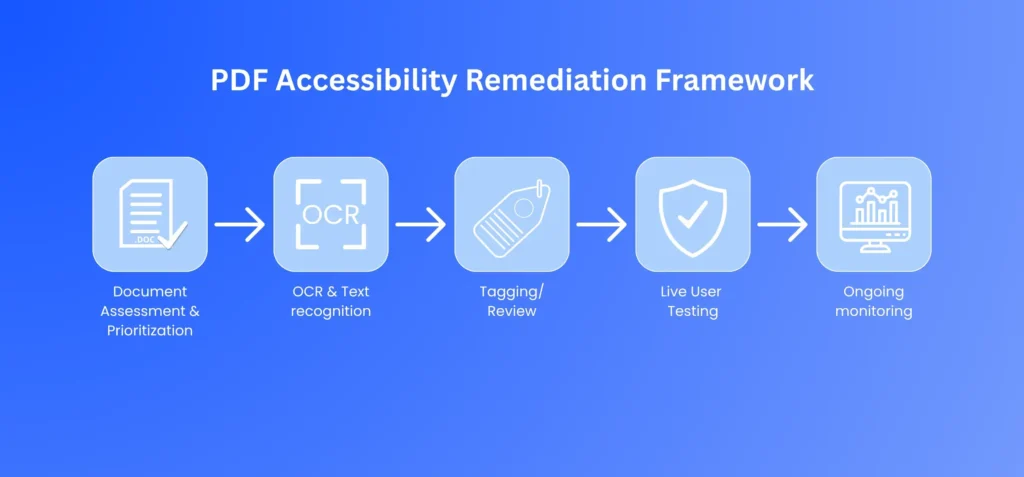
The following pdf accessibility remediation framework focuses on how organizations can plan, prioritize, and sustain accessibility remediation at scale.
1. Assessment and prioritization
Look at which documents people actually use. It might be reading lists for students, application forms, or reports that teams depend on. Start with these because fixing what matters most first makes the effort real and worth continuing.
2. Automated text extraction
Use reliable OCR technology to turn images into text that can be searched and read by software. This step makes the content easier to find and sets the stage for the next phase of accessibility work.
3. Accessibility tagging and review
After the text is captured, the next step is to organize it clearly with proper headings, lists, and image descriptions. A careful review by an expert ensures the document reads naturally and works well with assistive tools.
4. Testing and validation
Real users who rely on screen readers or other assistive tools should test the files to confirm they function in real life scenarios. This step uncovers issues that purely technical checks may miss.
5. Ongoing monitoring and improvement
Accessibility should be part of the everyday process of creating and managing content. Taking the time to review files regularly and following a simple, consistent approach for new documents helps keep everything in good shape and avoids future backlogs.
A mature remediation process blends automation with expert oversight and becomes part of the way you manage content. Once in place, it allows universities, government agencies, and companies to bring their archives into the present and keep them usable into the future.
From Awareness to Action: Making Your Scanned PDFs Accessible
Making scanned files accessible is really about giving everyone a fair chance to use and understand information. When organizations take the time to update their PDFs, they make life easier for students who rely on screen readers, employees searching for documents, and citizens trying to access public information. It turns stored content into something that can actually be used and shared.
Getting started does not have to be complicated. Begin by reviewing your archives, decide what matters most, and take small, steady steps toward accessibility. If your organization wants guidance, documenta11y’s expert team can help you bring old documents back to life and make them truly usable for everyone.
 Can AI Make PDFs Accessible? Detection, Remediation, and Where Humans Still Matter
 In-House vs. Outsourced Document Remediation: Costs, Risks, and How to Choose
 Automated vs. Manual Document Remediation